

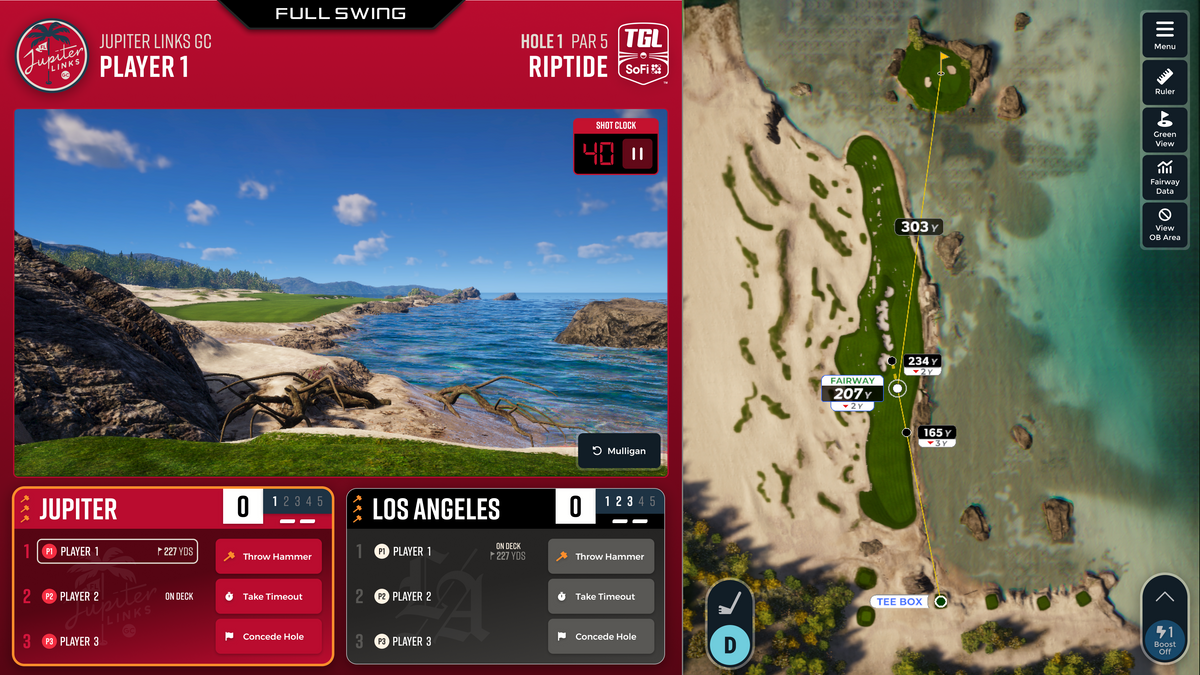
TGL changed what golf on TV looks like.
Primetime. Under the lights. Team against team.
And until now, you could only watch it.
Not any more.
The TGL Challenge brings the league’s signature holes and team format into your own space, on your Full Swing simulator or KIT Studio.
And it’s only available on Full Swing.
What Is the TGL Challenge?
The TGL Challenge is new software for Full Swing simulators and KIT Studio.
It lets you:
- Play TGL’s signature holes
- See how your game compares with the pros
- Represent the team you support
- Compete solo or head-to-head
- Use the Hammer, just like in the league
It’s TGL, played on the same technology that helps power the league.
Which TGL Holes Can You Play?
Iconic holes. New challenges.
The TGL Challenge features the league’s signature layouts:
- Stinger
- Cenote
- Quick Draw
- Last Toll
These are holes you’ve watched the pros play. Now it’s your turn.

How Does Team Play Work?
This is what makes the TGL Challenge different from a normal round.
You’re not just playing for yourself.
- Pick your TGL team before you start
- Represent them in every round
- Bring your friends’ teams into it for a proper rivalry

What Is the Hammer?
The Hammer is one of TGL’s most talked-about features, and it’s in the TGL Challenge too.
Throw the Hammer to:
- Raise the value of the hole
- Put your opponent under pressure
- Turn the match in a single shot
One swing can change the match.

Solo or Head-to-Head: Which Mode Is Right for You?
Solo
- Learn the holes
- Sharpen your game under TGL conditions
- Chase your best score
Head-to-head
- TGL-style competition with friends
- Team rivalries and bragging rights
- Perfect for game nights and hosting

Can You Play the TGL Challenge on KIT Studio?
Yes. The TGL Challenge works with both:
- Full Swing simulators, including the Pro 2.0
- Full Swing KIT Studio
Already own a Full Swing setup? You can add the TGL Challenge to your existing simulator or KIT Studio. Contact the team to get started.
Not sure how to set up a match? This week’s video walks you through it step by step, from building your match to playing it on KIT Studio.
How Much Space Do You Need to Play?
If you’re thinking about a setup to play the TGL Challenge at home, KIT Studio starts from a room with:
- Ceiling: 9ft (2.74m)
- Width: 12ft (3.66m)
- Length: 18ft (5.49m)
The Bottom Line
You’ve watched TGL.
Now you can play it.
Pick your team, take on the league’s signature holes, and decide when to throw the Hammer.
The challenge is on, and it’s only on Full Swing.
Teilen:
What Simulator Does TGL Use? The Full Swing Technology Behind TGL